Subject:
|
Re: taking good photos
|
Newsgroups:
|
lugnet.space
|
Date:
|
Tue, 20 May 2003 11:11:27 GMT
|
Viewed:
|
4078 times
|
| |

|
|
3.1 megapixels, 3x optical (3.3x evil digital zoom :-)
2160 x 1440 pixels
focusing range is 2ft/0.60 mm to "infinity"
How do I get legocam?
Thanks for your help! I want people to be able to see more than my
thumbnails in good detail :-)
> What's the megapixel rating, optical zoom rating (digital zoom is an
> oxymoron, and should never be used), total pixel-by-pixel size of the images
> it produces? Also, what's the listed focal range (you might need to check
> the manual for that one)?
>
> > It looks great when I download it from the camera into the software viewer.
> > But when uploaded to brickshelf it's huge and fuzzy.
>
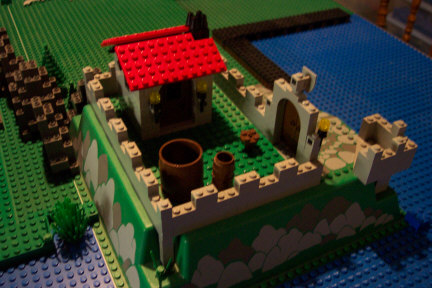
> Bad images often look better when they're seen in a smaller size. My
> camera produces 1600x1200 pixel images that have a slight tinge of fuzziness
> to them when doing close shots. I crop them, and then reduce the image size
> to get them down between 400-600 pixels on the longest side, after which I
> use an image-sharpening function to make the detail pop a bit more.
> Technically it's bad photography, but you _can_ clear up a certain amount of
> blur by reducing total image size (image, not file) and by sharpening the
> image (but not too much or you'll cause ugly pixelation).
>
> > Someone in this newsgroup once told me to modify the picture size on my >camera. But I only have such settings as "best, better, good". The "best" >ones were huge and fuzzy. When I switched to "good" hoping to reduce the >size of the jpg it just turned out huge and fuzzier...any ideas?
>
> If you're going to continue using that camera, you'll probably need to
> start editing the images after you produce them, or you'll have to see if
> changing the way you photograph will improve your photo quality. I've
> managed to track down your Brickshelf account (not easy, but I did it), and
> I downloaded this image:
>
> http://www.brickshelf.com/cgi-bin/gallery.cgi?i=363699
>
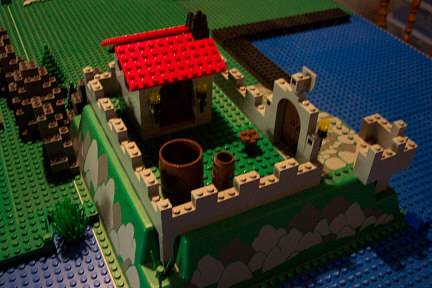
> I reduced the image size to 1/16th the total original pixel area, which
> did wonders for the image quality:
>
> http://www.collectinghq.com/im/0002922.jpg
>
> I then used the sharpen function on it, which made a minute
> improvement, but not nearly as much as reducing it:
>
> http://www.collectinghq.com/tn/0002922.jpg
>
> In other words, your camera can be worked with, but you'll need some
> sort of image-editor that can both read _and_ write JPG files, and alter
> image size. I happen to use the LEGOcam software, since it happens to be
> the only editor that I already have that can resize by total pixels instead
> of percentages, and that allows me to move a cropping window without moving
> the contents of that window. The color correction feature is almost
> useless, and the bells and whistles are pretty scarce, but it does the job.
> If nothing else is available, and you use a PC with some sort of Windows OS,
> you should have MS Paint on it. The default version only writes BMPs, which
> are horrible for webuse, but the only thing it needs to write JPGs is a JPG
> filter, which can be found for free on the web if you look a bit. IIRC,
> adding it to the Paint program might require editing your registry a bit,
> though.
|
|
Message has 2 Replies:
 | | Re: taking good photos
|
| (...) Please don't be offended, but looking at this picture: (URL) I would say that the problem is not your camera, but your technique. I have been struggling to improve my photography skills ever since I got a digital camera, and I find that 2/3 of (...) (23 years ago, 20-May-03, to lugnet.space)
| | | Re: taking good photos
|
| (...) Since the focus range for your camera is 2 ft to infinity, you will need to place your camera at least two feet from whatever model you are taking a picture of in order to get a sharp photo. Since you have a pretty good optical zoom, that (...) (23 years ago, 20-May-03, to lugnet.space)
|
Message is in Reply To:
| | Re: taking good photos
|
| (...) What's the megapixel rating, optical zoom rating (digital zoom is an oxymoron, and should never be used), total pixel-by-pixel size of the images it produces? Also, what's the listed focal range (you might need to check the manual for that (...) (23 years ago, 18-May-03, to lugnet.space)
|
22 Messages in This Thread:


- Entire Thread on One Page:
- Nested:
All | Brief | Compact | Dots
Linear:
All | Brief | Compact
This Message and its Replies on One Page:
- Nested:
All | Brief | Compact | Dots
Linear:
All | Brief | Compact
|
|
|
|